



Arizona Water Company has a new online portal for customers to pay and manage their bill.
Want to create your myAWC Portal? To activate your myAWC portal simply click the “Go to myAWC Portal” button. From there you will need your new account number, personalized activation code, and a valid email address. If you require assistance finding your new account number or activation code please call any of our 12 division offices and a customer service representative can assist you by providing that information.
*Note: Effective April 6, 2026, all previous online accounts and logins will deactivate. Any previous scheduled payments and account preferences must be re-established through myAWC. You are not required to activate myAWC to pay your bill and you can pay your bill through any of our other payment methods.
With the myAWC portal you can:
- Manage your account and pay your bill online
- Pay online by credit card, debit card, or ACH
- Enroll in and manage SurePay
- View payment history and previous meter reads
- Make one-time payments
- Set up and manage automatic payments
- Enroll in paperless billing
- Manage all service accounts from one place
- Submit general inquiries and requests
Automatic Payments with SurePay
Never worry about missing a payment again. Have your monthly bill paid automatically from your bank account. About 10 days before the payment transfer, AWC will send you a copy of your water bill so you know in advance when the transfer will take place and the amount of your bill.
If you choose to participate in our SurePay autopay program, you will not receive a return envelope with your monthly bill.
You can sign up, manage, or cancel SurePay through the myAWC portal.

Other Ways to Pay
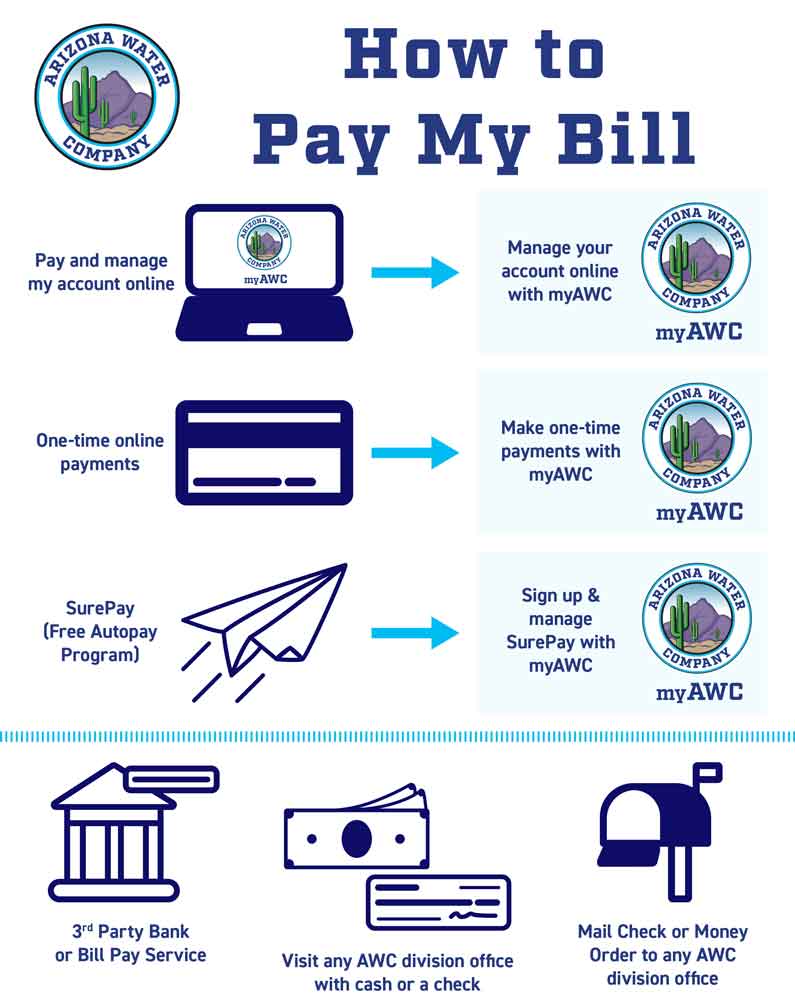
3rd-Party Bank or Bill Pay Service
Be sure to provide your new AWC account number to the third-party paying service. If they request your monthly bill be sent to them directly, call or visit your local AWC division office.
Customers can pay their AWC bill by phone by calling 855-356-0722
Note: Effective April 6, 2026, all Arizona Water Company customers will receive a new account number for their account. Customers must provide third-party bank and/or bill pay services with the new account number to avoid missed or delayed payments and late fees by an outside vendor.
Check or Money Order Mailed through the USPS
Arizona Water Company provides a return envelope with your monthly water bill for your convenience. Be sure to affix the proper postage so your payment arrives on time.
If you’ve misplaced the return envelope, address an envelope to:
Arizona Water Company
P.O. Box 29098
Phoenix, AZ
85038-9098
Visiting any of our Local Offices
Arizona Water Company has 12 local offices throughout Arizona. When customers call, email, or visit any office, a local Customer Service Representative can assist in paying your bill, turning service on or off, and answering account-related questions.
Additionally, local offices have drop box locations for secure payments after business hours.
Frequently Asked Questions
Yes. Payments sent through USPS should be mailed to:
Arizona Water Company
P.O. Box 29098
Phoenix, AZ 85038-9098
Fax: 602-240-6874
You have multiple different options to change your mailing address with Arizona Water Company.
- First, you can change your mailing address through the myAWC portal by simply updating your contact information.
- Second, you can visit or contact any of our division office locations, and one of our customer service representatives will happily assist you.
- There is a dedicated space on the back of your pay stub for you to note mailing address changes. If you choose to mail your payment with your pay stub, after your payment is processed, your mailing address will be updated.
Yes. You may request your water service to be disconnected by contacting your local Arizona Water Company division office. You can also request a disconnection by submitting a request through the myAWC portal. AWC offers two different types of water disconnect services:
- Close Account/Final Bill: Water service is disconnected and a final bill is rendered to you. If you re-establish service within 12 months, you must pay back the minimum or eight times the minimum, whichever is less, as a re-establishment fee.
- Courtesy Off: A Courtesy Off is primarily used when a dwelling is to be vacant for a temporary period. Water service is temporarily disconnected until you request to turn your service back on. During Courtesy Off your minimum monthly bills will continue to be rendered and are due and payable monthly.
If the courtesy turn-on or turn-off is made during regular business hours, Arizona Water Company provides this service at no charge. Please provide advance notice of at least three business days. Regular business hours are Monday – Thursday, 7:30 am – 5:00 pm, and alternating Fridays from 7:30 am – 4:00 pm. If the courtesy turn-on or turn-off is made after regular working hours, there is a $35 after-hours charge.
The SurePay program is an electronic automatic payment option available to all Arizona Water Company customers. To be eligible for SurePay your account must be in good standing and not subject to existing payment arrangements.
Arizona Water Company does not charge any fees to use SurePay as an auto-pay option. However, some financial institutions may charge a fee for electronic fund transfers. Please check with your financial institution about a potential fee.
Select Surepay as a preferred auto-pay program and enter your banking information in the myAWC portal.
Notice of the first automatic deduction from your bank account will appear on your Arizona Water Company bill within 1-2 billing cycles after enrolling in SurePay. If you are an active SurePay participant, the following notice will appear on all your water bills: Autopay is scheduled for 00/00/2026. Until SurePay has taken effect, customers should continue to make payments through other payment methods.
Payments may be rejected by your financial institution because of insufficient funds, closed/unauthorized accounts, or other reasons. Check with your financial institution for possible fees it may impose. If a payment is rejected, Arizona Water Company will apply its authorized service charge on your next water bill. The Company reserves the right to terminate your participation in the SurePay program at any time.
SurePay cancellation form, complete, print, sign and mail or fax to the address listed above. Termination will become effective within 10 business days after the Company receives your notification.
To cancel SurePay, change your preferred payment method in the myAWC portal. Termination will become effective immediately. Any payments that are scheduled at the time of termination will be processed on the scheduled date and no future payments will be processed.
NO. Arizona Water Company will never call customers to request bank account or credit card information. Do not give out your personal or financial information to any unknown caller.
All Arizona Water Company employees wear uniforms with the Arizona Water Company logo clearly visible and drive vehicles with the Arizona Water Company logo displayed. Employees also carry Arizona Water Company ID badges with the employee photo and title. Arizona Water Company employees will never ask to enter the home to test the water. Arizona Water Company employees will only enter your home to perform a water audit at your request.
myAWC allows customers to:
- View and pay bills online
- Enroll in automatic bill payments
- Sign up for paperless billing
- View payment history
- Manage a digital wallet for online payments
- Access previous meter readings
- Apply for rebate programs
- Start and stop service
- Update address and contact information
- Grant a delegate user to help manage the account
- View, access, and manage all water service accounts conveniently in one location
- Inform AWC that you are on home dialysis
- Request water conservation information
- myAWC is enabled in both English and Spanish
- Complete landlord agreements
- Easily communicate with AWC by submitting general inquiries and service requests
- Upload supporting documents for various requests or accommodations
Customers can activate their myAWC account by accessing the myAWC portal through www.azwater.com. From there customers should select “Sign up now” and then follow the prompts to activate their myAWC account portal.
To activate your myAWC portal you will need the following:
- A valid email address
- A 6-digit verification code, which is provided to you by Arizona Water Company.
- Your new account number, also provided to you by Arizona Water Company.
In April 2026, all current Arizona Water Company customers received their new account number as part of the official activation letter announcing myAWC.
After April 2026, all new customers received their account number in the official welcome letter upon starting water services with Arizona Water Company.
If you cannot locate your account number, please contact your local division office.
No. Arizona Water Company does not require customers to activate a myAWC account portal.
Customers that do not activate their myAWC portal will need to pay their bill through any of the other payment options provided by Arizona Water Company. If customers want to make changes to their account, such as updating their contact information or applying for a rebate, they will need to do so by contacting or visiting one of our division offices. For more information about other payment options please visit our pay a bill page or contact your local division office for assistance.
Customers can activate or deactivate their myAWC account portal at any time.
It depends. If all your water service accounts are under the same name and mailing address, then all your water service accounts will automatically be in one myAWC portal once it is activated.
If your different water service accounts are under different names or different mailing addresses, then you will receive instructions for how to create a myAWC for each individual account. If you want to manage all your accounts from one myAWC portal, then you will need to contact a customer service representative at any of our 12 division offices to assist you in transferring all your water service accounts into one singular myAWC portal.
No. Effective April 6, 2026, all previous online accounts and associated logins with Arizona Water Company through our previous online account portal will be transitioned over to myAWC. If a customer wants to manage their account online or make one-time payments online, they must do so through the myAWC portal.
Yes, all previously established preferences on your account, such scheduled payments, automatic payments, e-billing, and enrollment in SurePay will remain intact. However, if you wish to modify or cancel any of these preferences, you must do so through the myAWC portal.
Yes. Arizona Water Company will continue to process customer accounts with previously scheduled bank payments or SurePay. However, all previous online accounts and associated login information that existed before myAWC will no longer exist. You can re-establish your login and change your account preferences by accessing your myAWC portal.
Yes. Customers can continue to pay their bill through SurePay or scheduled bank payments. Customers can also sign up for SurePay through the myAWC portal. However, if customers want to pay their bill online or set up automatic payments, they must do so through myAWC.
Yes. If you wish to make online payments to your bill and manage your account online you need to activate your myAWC account portal.
All previous online accounts were transitioned to myAWC on April 6, 2026. All previous usernames and passwords for online accounts prior to April 6, 2026, no longer exist.
Yes. Cash, check, or money order payments can be made when visiting us in-person and talking with any of our customer service representatives at any of our 12 locations across Arizona.
Additionally, check and money order payments can be mailed through the USPS to:
Arizona Water Company
P.O. Box 29098
Phoenix, AZ 85038-9098
First, activate your myAWC portal. Once your myAWC portal is activated you can sign up for paperless billing by selecting “Paperless communications” button in the Preferences section of your myAWC account. 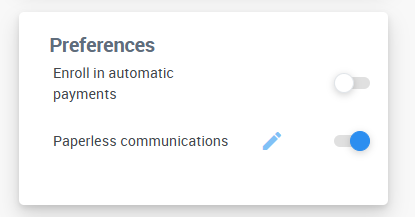
You can enroll in automatic bill payments in your myAWC account by selecting the “Enroll in automatic payments” button in the Preferences section of your myAWC account. From there you will be prompted to provide your payment information to set up automatic payments.
myAWC gives customers the ability to grant friends or family access to their water services account. Someone that has been granted access to your water services account with Arizona Water Company is referred to as a delegate user.
A delegate user is someone to help you manage your account and keep your water services in good standing. Delegate users are chosen by you, and they are granted access to your account by you when you provide them with an access link through your myAWC portal.
Yes. With the launch of myAWC, previous existing landlord agreements will need to be re-established with Arizona Water Company. Customers can set up landlord agreements through the myAWC portal or by contacting a customer service representative at any of our division offices.